

One of the ways I save money when I buy things is to stack multiple discounts together. This is the most common question I get asked from friends and family during get togethers so I thought I’d share an example of this is action for my readers.
This post may contain affiliate links, meaning I get a commission at no cost to you if you decide to make a purchase through my links. Visit this page for more information. The content on this page is accurate as of the posting date; however, some of the offers mentioned may have expired.
Buying a Laptop for Content Creators
I started a YouTube channel recently and quickly learned that I needed a powerful laptop to edit videos with Adobe Premiere. One of the best laptops for this is the Yoga Pro 9i Aura Edition by Lenovo, but it’s a pricey machine.
The cost in the configuration I wanted came out to $2,509.99.
So here’s my step-by-step process on how I maximized my savings on this purchase. It can serve as a blueprint the next time you shop online.
1. Create A Store Account
The first thing you should do is to create an account at the store you’re shopping at. This can provide immediate savings in the form of a new member discount, coupon code, or other one-time offers.
With Lenovo, they actually gave me two offers that were stackable. The first was a ‘Cart Threshold Savings‘ discount if I spent a certain amount and the other was a ‘Loyalty Savings‘ discount for simply being a “loyal” member.
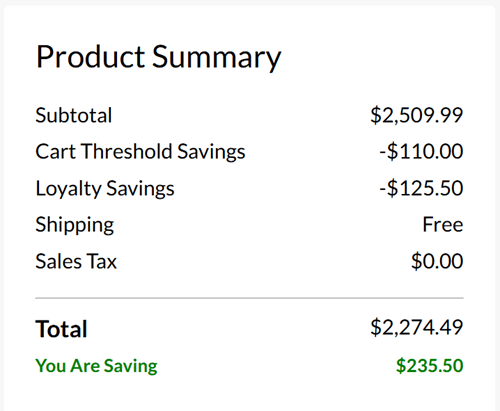
By simply opening an account at Lenovo, I saved $235.50 right out of the gate.
2. Sign Up for Loyalty Rewards
Most stores also have some type of loyalty program that you can join for free. You earn rewards every time you shop and then use them towards future purchases.
The loyalty program for Lenovo is called My Lenovo Rewards. Almost every purchase gets 3% to 9% of the purchase back in rewards dollars.
The laptop I ordered offered 6% back, which means I now have $136.66 to use for a future purchase.
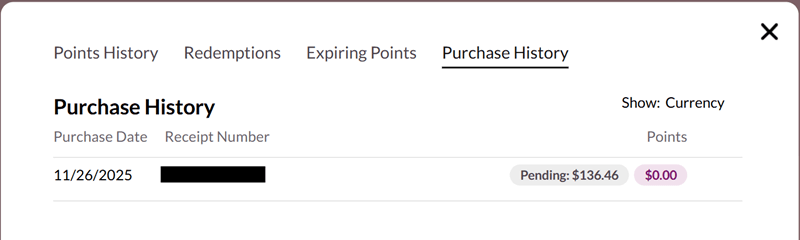
Rewards will show up as pending until your return window closes. They want to make sure you’re keeping the item before releasing the rewards.
3. Use Cash Back Shopping Portals
You might be thinking that all of the above sounds great and now you’re ready to make your purchase, but wait – there’s more!
You should always use a cash back shopping portal. Never go directly to the store to shop.
Cashback shopping portals are websites that reward you for shopping online, allowing you to earn extra rewards on purchases you’d make anyway.
Once you sign up, all you need to do is find the store you want to shop at within the portal, click the link to transfer to the store’s website, and shop as usual. You pay the same price, but receive cash back, usually between 2% to 15%.
One of my favorites is Rakuten (if you don’t have an account yet, my referral link gives you a $50 bonus). I also made a YouTube video to show you how it works:
Rakuten increased its cash back rate at Lenovo to 12% on Black Friday, so I earned an additional $272.94 just by clicking a link. How great is that?
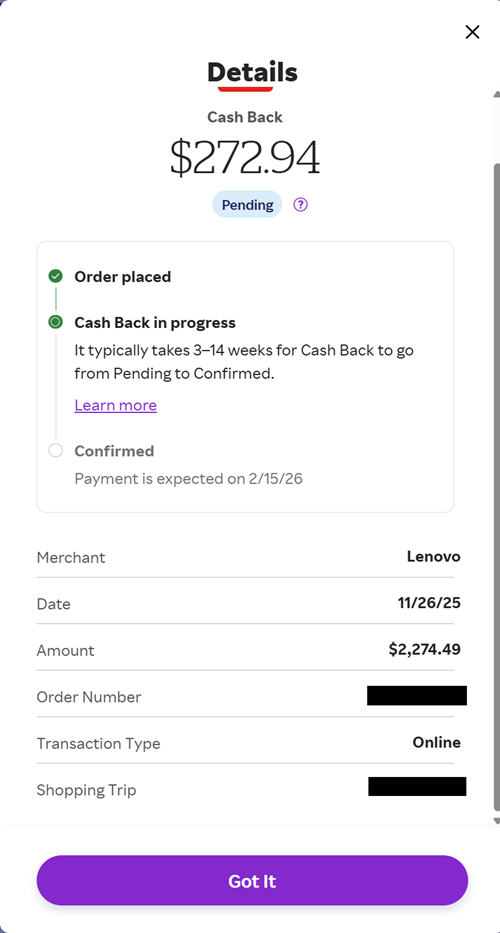
Rakuten pays users in three-month cycles and will automatically deposit the cash into your selected bank account.
4. Leverage Credit Card Linked Offers
I think a lot of readers already know that using credit cards can be advantageous when used responsibly because of the free cash back, points, or miles that you can earn. That’s in addition to all the juicy welcome bonuses that the best credit cards offer.
But what’s still relatively unknown is that many of the same credit cards have these limited-time spending offers that you need to manually add to your card:
- American Express with Amex Offers
- Bank of America with BankAmeriDeals
- Chase Bank with Chase Offers
- Citi with Citi Offers
As luck would have it, my American Express card has a 15% back offer at Lenovo, up to $100:
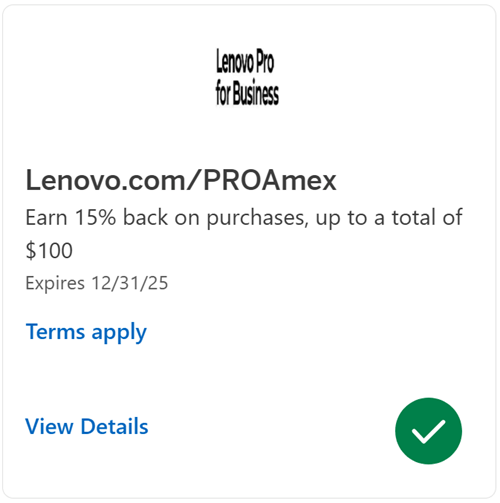
It would take a purchase of $666.66 ($100 ÷ 0.15%) to max out the $100 for this specific offer. Since the laptop cost me $2,509.99, I’m well past the limit and will receive a $100 statement credit for this purchase.
Like I mentioned earlier, you need to manually activate each offer, which can get really annoying. For instance, I have over 300 offers on one single Amex card. That’s a lot of clicking!
An easy fix for this is to use CardPointers, which is a mobile and web app designed to help users maximize credit card rewards by tracking bonuses, offers, and perks across their different cards.
One of my favorite features of CardPointers is that it automatically adds every single offer to every card you hold. This perk alone has saved me hours and hours of mindless clicking to activate my offers (and prevented getting premature carpal tunnel syndrome).
You can use my CardPointers link to try it out for free.
The Bottom Line
In the end, while I paid $2,509.99 upfront for this very nice laptop, I managed to massively save from the following:
| Savings Description | Amount Saved |
| Lenovo Cart Threshold | $110.00 |
| Loyalty Savings | $125.00 |
| My Lenovo Rewards | $136.46 |
| Rakuten Cash Back | $272.94 |
| Amex Offers | $100.00 |
Add up all those line items and the total savings is a whopping $744.40.
That means on my $2,509.99 purchase, it will end up really costing me only $1,765.59. Percentage wise, that’s nearly 30% off the charged price!
All from just clicking the mouse or tapping your phone a few extra times.
Have any of you stacked or combined offers like this? Let me know in the comments below!

You forgot to mention regular cashback on amex card that is probably 1% more right? I am also checking gift cards for particular store and apply it after visiting store through rakuten
Hey Andrei – good question! I left the card-earning part out since everyone holds different credit cards. I used my American Express Business Platinum card which earns 2x points for electronic goods retailers, so I got 4,599 Amex MR points for this purchase. But yes, I absolutely should have added this to my cost breakdown. I value each Amex point at a conservative 1.5¢ each, so this is an additional ~$68 in value.